


Natural Conversations
Seamlessly integrates with your AI agents to deliver timely feedback. Grasp the essence of AI responses effortlessly with smooth, natural audio.

Unlimited Access & Voice Playback (TTS) Voice Preview
Made In Japan
Voice Preview provides high-quality, unlimited text-to-speech functionality. It summarizes complex AI development processes into clear audio, allowing for a more intuitive and efficient workflow.


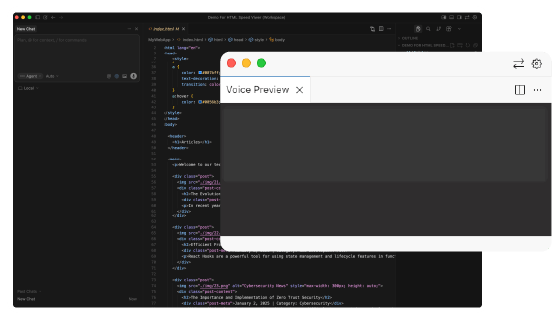
Seamlessly integrates with your AI agents to deliver timely feedback. Grasp the essence of AI responses effortlessly with smooth, natural audio.

Stop straining your eyes. Voice Preview reads out key takeaways and next steps, allowing you to transition from "reading to understand" to "listening to decide."

Enjoy unlimited text-to-speech with a flat monthly fee. Unlike pay-as-you-go APIs, you can use it as much as you need without ever worrying about the cost.
Supported Applications

Unlimited playback

Stay in the flow. Hear your progress.A seamless integration between AI agents and Voice Preview.
While you step away from your desk to grab a coffee—
Your AI agent keeps you updated, reporting the development status directly through your wireless earbuds.

Unlimited playback
Eye strain from staring
at the screen for too long.

Information overload
from the massive amount of AI-generated data.

A desire to stay ahead
by mastering the latest AI workflows.

Voice Preview summarizes tasks through audio.
Keep your development "Eye-Friendly," "Effective," and "Enjoyable"
—all while sipping your coffee.

Reduce screen time and significantly lighten the cognitive load on your eyes.

Minimize the constant back-and-forth between reading and coding. Stay focused on the task at hand.

"Multitask" with your earbuds. Keep track of progress even when you step away.

Receive summaries, status updates, and next steps without stopping your primary work (implementation/review).
Transform "Reading Time" into "Listening & Deciding Time."
Save your attention and only return to the screen when your action is truly needed.

Execute tasks with your usual tools like Cursor, VSCode, or Codex CLI.

Voice Preview summarizes the AI agent’s results and delivers them via audio. Stay informed while away from your desk, during breaks, or while working in other windows.
Reduce the frequency of "checking the screen" to rest your eyes and maintain deep focus.
A VSCode-compatible extension designed to help you grasp essential information by "listening" before you "read."
Quickly grasp key points from long AI responses before diving into the details.
Follow progress while coding or multitasking.
(More languages available upon request—contact us for details).
Stay updated via earbuds even when you're away from your desk.
No local server required. Designed for instant use.
Control playback directly from agents like Cursor, CLI tools, or Copilot.

● Unlimited Voice Playback
70%
Splitting information between visual and audio channels enhances comprehension.Success Rate: 70% Research shows that 70% of users perform better with "Graphics + Audio" compared to "Graphics + On-screen Text."

73%
Taking a "micro-break" often leads to better solutions. Success Rate: 73% In a meta-analysis, 85 out of 117 cases (approx. 73%) showed positive results when participants took a break from the task.

10Minutes
Even short breaks are effective. Recovery Time: Within 10 Minutes Short breaks under 10 minutes are reported to boost vigor and significantly reduce fatigue.

Note:
Note:
Note:

3 Easy Steps to Start

Turn on the MCP feature and register the dedicated prompt.

Instruct your AI in Cursor or VSCode to create specs or write code.


The AI automatically provides audio feedback on the summary and next steps, reducing your review workload.
Voice Preview is built specifically to reduce the burden of reading. Our architecture ensures that your data is neither stored nor used for training.
Voice Preview only processes text from your AI agents (such as Cursor, GitHub Copilot, etc.) to generate audio. We never collect or use your code or conversations to train our models.
Text data is never stored for training or any other purposes. Once the audio is generated, the processed content is immediately discarded and not accumulated.
Data is transmitted to our servers over a secure connection only during the audio generation process. We do not save the transmitted text. To ensure service reliability, we maintain minimal communication logs (e.g., timestamps, success/error rates, and usage metrics), which do not include your actual content.
Need help or have a question? We’re here for you. If you have any concerns before signing up or encounter any issues while using Voice Preview, please don't hesitate to reach out. Simply fill out our contact form—this is your dedicated channel for all support and inquiries.
We build for you. Many of our recent features and improvements were directly inspired by user feedback. Your voice helps us make Voice Preview better.
Feel free to contact us about:
Unlimited playback
Flexible plans to fit your needs. Start for free today. Upgrade to Plus as you grow.
(Note: Voice Preview is available exclusively on Plus and higher plans.)

Essential Features for Seamless Development

Accelerate Your AI-Driven Development

For Teams & Organizations: Enterprise-Grade Management
Plus Plan: After signing up, you can start your subscription directly from the Member Dashboard.
Team Plan: We offer customized solutions based on your team size and specific requirements. Contact us for details.
A. Voice Preview is the TTS (text-to-speech) feature included in the HTML Speed Viewer Plus Plan. It lets AI agents like Cursor, Codex CLI, and Copilot play responses as high-quality audio.
A. Voice Preview is part of the HTML Speed Viewer Plus Plan. New members can start with a free trial period.
A. Voice Preview processes only what’s needed for playback—no storage, no training, and no human review of your input. For details, see our Privacy Policy.
A. Voice Preview currently supports Japanese and English. We plan to add more based on user requests.
A. Voice Preview requires no local server. Just adjust your AI agent prompt and MCP settings to get started.
A. If you wish to request a refund, please contact us via our inquiry form. We will review your usage history and payment status, then process your request in accordance with our Refund Policy.
Unlimited playback